Posts

Posts mit dem Label "Office 365" werden angezeigt.

SharePoint Online: NEU - Vorlagen für neue Seiten

Bild
Beginnt man eine neue Seite in SharePoint, muss neben den inhaltlichen Vorbereitungen der Texte, auch die Struktur und der (Layout-) Aufbau geplant werden. Dieser Vorgang nimmt - je nach Komplexität der Inhaltsseite - viel Zeit in Anspruch. Um nun nicht jedes Mal von 0 zu beginnen, stehen über die neue Microsoft Vorlagenbibliothek zahlreiche Vorlagen (Templates) zur Auswahl bereit. Der Start basierend auf einer Vorlage beschleunigt die Anlage und die Strukturierung erheblich. Die einzelnen Elemente sowie der Inhalt der Vorlage müssen anschließend nur noch an die eigenen Bedürfnisse angepasst werden. Danach kann die Seite direkt publiziert werden. Das folgende Video stellt kurz das neue Feature vor.
Use PnP PowerShell cmdlets (SharePoint / Office 365) with PowerShell Version 7.x & Visual Studio Code

Bild
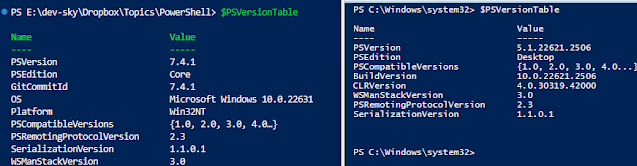
If you want to use the PnP PowerShell cmdlets for Microsoft 365 environments and products such as SharePoint Online, Microsoft Teams, Microsoft Planner, Microsoft Flow and more you need to install at least Windows PowerShell Version 7.2. The standard PowerShell version on Windows systems is version 5.1. This version is not longer being developed and the version can only be used with Windows operating systems. The 5.1 version based on .NET Framework 4.5. The new PowerShell generation starting with version 6.0 based on .NET Core 2.0. This means that PowerShell version 5.1 and 6.0 is completely independent. Features like the Windows PowerShell Integrated Scripting Environment (ISE) is no longer compatible with the new version 😒. For various compatibility reasons, also the following modules are no longer included in the new PowerShell: Microsoft.PowerShell.LocalAccounts Microsoft.PowerShell.ODataUtils Microsoft.PowerShell.Operation.Validation PSScheduledJob PSWorkflow PSWorkflowUtilit...